
Features
One calm place for the household money.
Everything OurJamJar does, from the bank feed to the mortgage payoff date. Screenshots use made-up demo data.
Dashboard
What’s left this week, in one number
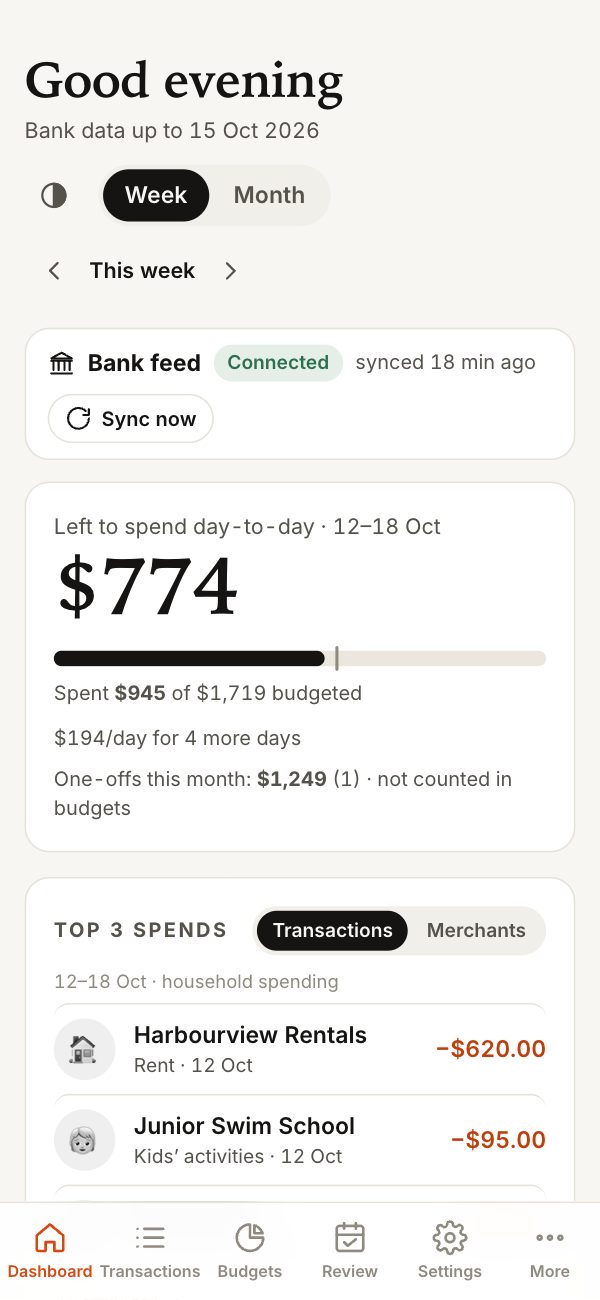
Open the app and the first thing you see is how much is left to spend day-to-day this week, how fast you’re spending it, and a daily allowance for the rest of the week. Switch to month view for the bigger bills.
- Left-to-spend with a pace marker
- Top spends by transaction or retailer
- “Needs attention” for overspends, bills and expiring fixed rates
Bank feeds & import
Transactions come to you
Upload CSV statements from internet banking today — duplicates are skipped and transactions are tidied up automatically. Live bank feeds through Akahu are coming soon, so new transactions will arrive on their own.
- Read-only access via Akahu (coming soon)
- Smart categories, plus your own “always categorise this as…” rules
- Transfers between your own accounts left out of your spending
- CSV import for Westpac and ANZ formats, plus a generic option
Bank feed Coming soon
Approve read-only access with your bank through Akahu. New transactions appear as your bank releases them — usually daily.
CSV upload
Drag in a statement export. Re-importing the same dates won’t double up.
Budgets
Weekly, monthly, or both — in a real spreadsheet
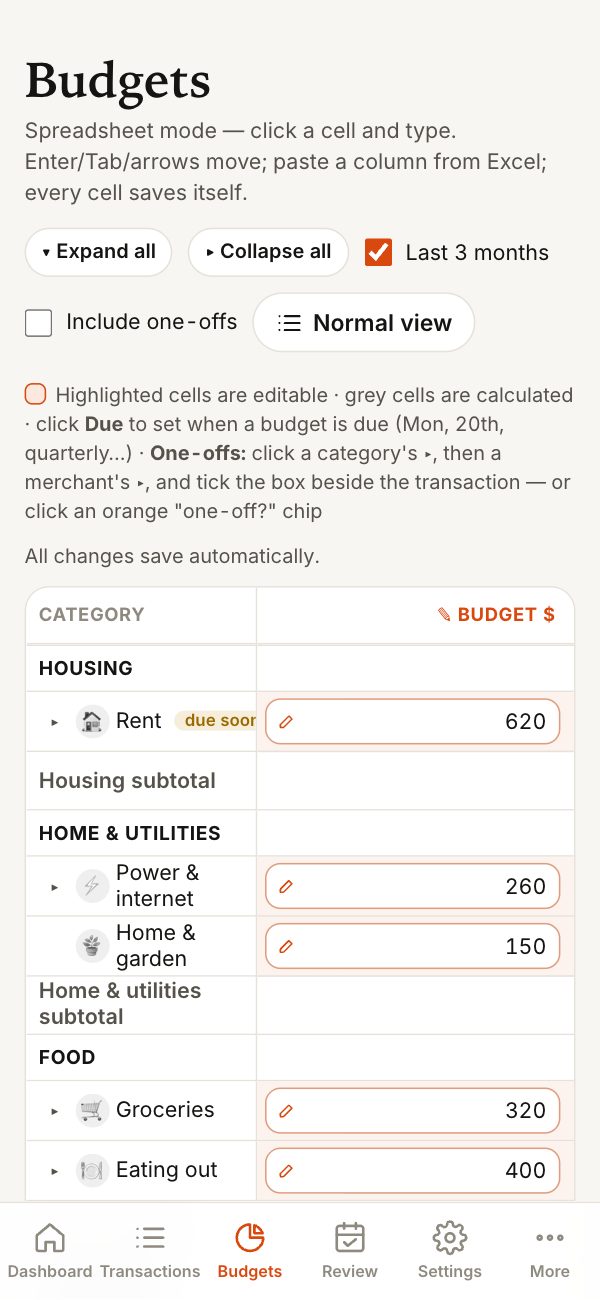
Budget each category the way it’s actually paid: groceries weekly, insurance monthly, rates quarterly. The spreadsheet view puts it all on one editable grid, and the list view is there when you just want the bars.
- Click and type, Tab and arrow keys, paste from Excel
- Due dates per category — “every Monday”, “the 18th”
- Actuals for this month and previous months alongside
- Rename, regroup and add categories to suit your household
Spend by retailer
Know your top ten shops
Every merchant, ranked by what you spent there, with visits, average spend per visit and a trend line. See the biggest increases since last period and compare retailers side by side.
- This month, 3, 6 or 12 months, year to date or custom
- Weekly or monthly trend
- Drill into any retailer’s history

Subscription finder
Every repeating charge, with its yearly cost
OurJamJar finds charges that repeat and adds up what they cost each year. Mark each one keep, review or cancelled — it’s a prompt to check, never a judgement.
- Streaming, apps, gyms, insurance and memberships
- Potential saving if you cancel what’s flagged
- Running total of what you’ve already cancelled

One-off tracking
Big purchases, kept in their own jar
A new washing machine shouldn’t make your weekly budget look broken. Flag big, unusual spends as one-offs: they’re still counted and reported, just kept out of your everyday budget and averages.
Included when you want them
Toggle one-offs on in reports, retailer views and the budget grid to see the full picture — or leave them out to see your normal week.
Bill calendar
See what’s coming before it lands
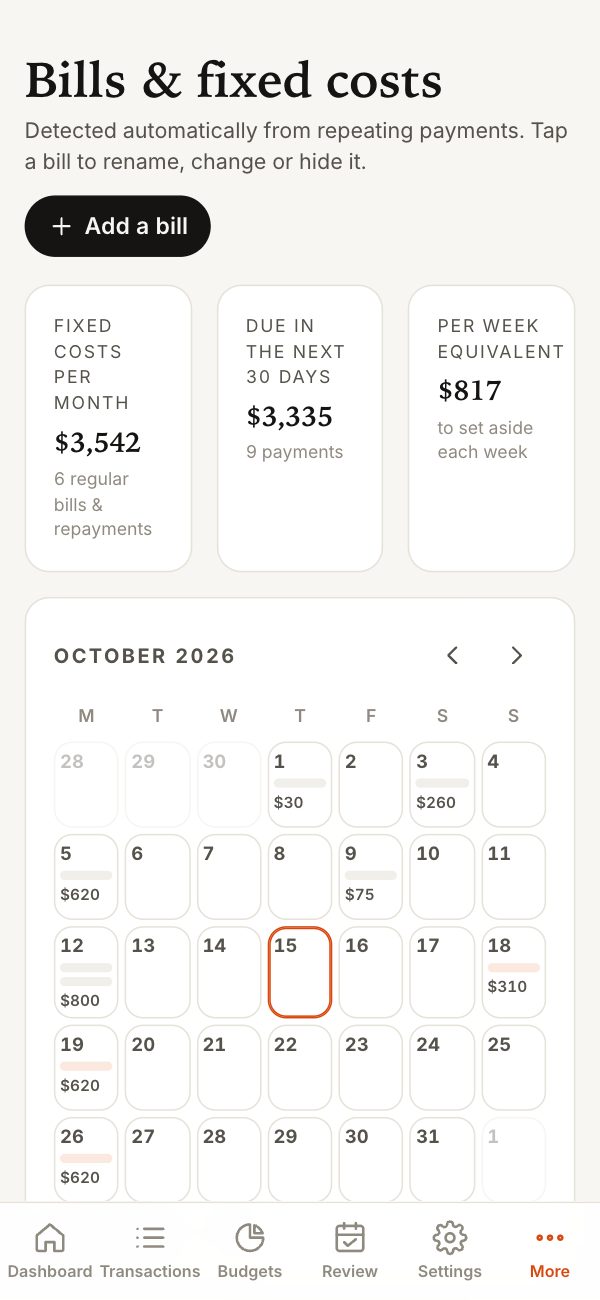
Regular payments are spotted from your transactions and laid out on a calendar, with your monthly fixed costs added up. Add anything it missed by hand.
- Calendar of upcoming bills
- Monthly fixed-cost total
- A per-week amount to set aside for them
- Due-soon reminders on the dashboard
Mortgage & debts
A payoff date for every loan
Add your home loan, car loan or credit card. Balances roll forward from your last confirmed figure using repayments matched from your transactions, so you can see what you owe today and when it’ll be gone.
- Payoff projection and interest still to pay
- Fixed-rate end dates, flagged ahead of time
- Monthly interest cost at current rates

Savings scenarios
Try the “what ifs” before you commit
Set up a few income options side by side and see estimated tax, take-home pay, your monthly surplus and savings rate for each. Slide in extra mortgage repayments and watch the effect.
- Up to several options compared at once
- Estimated NZ income tax (an estimate, not tax advice)
- Five-year savings projection

Weekly & monthly review
Ten minutes, once a week, together
A short review with a scorecard, where the money went, a checklist, the bills due next, and space for notes. Mark it reviewed and you’re done until next week.
